Key Takeaways
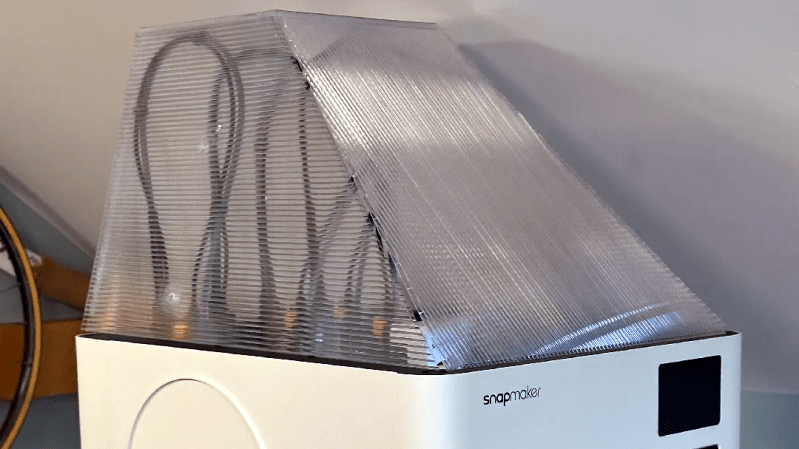
- Create a custom top cover for the Snapmaker U1 3D printer using cardboard or Coroplast
- No 3D printing is required, only a 3D model as a reference shape
- Coroplast is a suitable material due to its durability and ease of use
- The cover can be cut and folded to fit the printer, providing a simple and effective enclosure
Introduction to 3D Printer Covers
When it comes to 3D printing, a well-designed cover can be essential for maintaining a consistent printing environment. The Snapmaker U1 3D printer is a popular choice among enthusiasts, and creating a custom top cover can be a great way to enhance its performance. Recently, a user-created design has been making waves, utilizing a 3D model as a reference shape to create a cover out of cardboard or Coroplast.
Materials and Design
The design in question uses a 3D model as a template to create a cover out of Coroplast, a type of corrugated plastic sheet. This material is ideal due to its durability, ease of use, and affordability. With a thickness of approximately 3-4 mm, Coroplast can be easily cut and folded to fit the contours of the Snapmaker U1. The 3D model serves as a guide, allowing users to create a precise and effective cover without the need for 3D printing.
Comparison of Materials
| Material | Thickness | Durability | Ease of Use |
|---|---|---|---|
| Coroplast | 3-4 mm | High | Easy |
| Cardboard | 1-2 mm | Medium | Medium |
| 3D Printed Plastic | 1-5 mm | High | Difficult |
Creating the Cover
To create the cover, users can follow these steps:
- Download the 3D model and use it as a reference shape
- Cut out the Coroplast or cardboard to the required dimensions
- Fold the material to fit the contours of the Snapmaker U1
- Assemble the cover and attach it to the printer
Benefits of a Custom Cover
A custom top cover can provide several benefits, including:
- Improved temperature control
- Reduced noise pollution
- Enhanced print quality
- Increased durability of the printer
Bottom Line
Creating a custom top cover for the Snapmaker U1 3D printer is a simple and effective way to enhance its performance. By using a 3D model as a reference shape and Coroplast as the material, users can create a durable and easy-to-use cover without the need for 3D printing. With its numerous benefits and ease of creation, this custom cover is a great option for anyone looking to take their 3D printing to the next level.